
Home › Blog › Epiq RAID Configuration
Epiq RAID Configuration: Diagnosing Boot Failures and Software Reload Errors
September 1, 2026 | Reading time: 7 minutes | Philips EPIQ, RAID Configuration
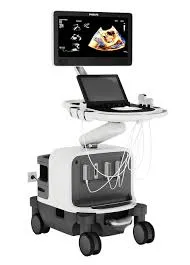
Introduction
An incorrect Epiq RAID configuration is one of the most common root causes behind two symptoms Philips ultrasound users report often: the system fails to power on or complete boot, or a software reload stops midway with no clear reason.
In both cases, the underlying issue is usually the internal RAID array that hosts the operating system and clinical image database, not the software installer itself. In this article we explain what causes it, how to recognize it, and why fixing it isn't a DIY job.
What is RAID configuration on an Epiq system?
Epiq systems use a RAID (Redundant Array of Independent Disks) array across internal mechanical drives to store the operating system, study databases, and clinical applications. This configuration depends on BIOS-level parameters and an Intel Rapid Storage Technology controller.
When one drive fails, is replaced without the correct procedure, or the firmware loses the volume reference, the array ends up in an inconsistent state the system cannot read at startup.
Common symptoms: boot errors and software reload failures
These are the most frequent signs of a RAID configuration problem on an Epiq:
- The system hangs on a black screen or the Philips boot logo.
- The unit reboots repeatedly without reaching the clinical interface.
- A USB software reload stalls or throws an error before completing.
- The system detects the physical drives but doesn't flag the RAID volume as Bootable.
- Array status messages such as degraded, uninitialized, or no volume defined.
Most common causes of RAID failures on Epiq systems
A damaged RAID array almost always has an identifiable origin:
- Hard drive replacement without reconfiguration — swapping a failed mechanical drive without recreating the volume on the storage controller leaves the system with an incomplete array that cannot boot.
- Volume sync loss — power interruptions during a software reload, or an improper shutdown, can leave the RAID volume flagged as degraded even when the physical drives are healthy.
- Motherboard or firmware changes — replacing the motherboard (A-cart or B-cart) can reset BIOS parameters related to the SATA/RAID mode, leaving the original array unrecognized.
Why RAID reconfiguration requires a certified technician
Rebuilding a RAID volume on an Epiq system requires accessing the system BIOS and the Intel Rapid Storage Technology utility using credentials and procedures that are part of Philips Healthcare's service documentation, restricted to certified personnel.
A single mis-executed step — for example, deleting the volume before verifying the real status of each drive — can cause total loss of stored images and studies. Our specialists can:
- Remotely verify drive and array status before touching any configuration.
- Rebuild the RAID volume following Philips-documented procedures.
- Validate the software reload and confirm stable boot before closing the case.
Conclusion
A boot failure or a stalled software reload on an Epiq system is frequently a symptom of a RAID array in an inconsistent state, not a sign the hardware itself has failed. Reconfiguring it correctly protects the studies already stored on the system and gets the equipment back in service faster.
At Triaxis Medical Service, we diagnose and resolve RAID configuration issues on Epiq systems remotely, with follow-through to final validation, minimizing downtime and risk to your clinical data.
Is Your Philips Epiq Failing to Boot or Reload Software?
Contact us now. Our specialists will perform a remote diagnosis of your RAID configuration and deliver a precise technical report with the recommended action plan.
Request Remote Diagnosis